Attentions AI
2026
Qira
Designing an AI-powered clinic platform around the people who use it every day

Overview
Building the operational backbone for modern dental clinics
Dental clinics juggle appointments, documentation, patient communication, billing, and staff management across disconnected systems.
Current use of Legacy software often forces every role from dentists to front desk staff through the same interface, creating unnecessary complexity and slowing everyday operations.
My Role
When I joined in February 2026, I had to document all workflows and role definitions. Before designing interfaces, I first needed to understand how a modern dental clinic actually operates and how each persona interacted with the system. Beyond design, I worked directly with the US-based founder, turned business requirements into product decisions, and kept things moving across product and tech
Problem
Healthcare workflows are complex, Software shouldn't make them harder
Most dental clinics operate across several disconnected system one for appointments, another for documentation, another for communication, and more for billing and operations. Rather than replacing legacy practice management software such as Dentrix, Qira sits above it as an intelligent operational layer, bringing AI-powered workflows and a modern user experience into a single platform.
Research
Stepping into clinics to understand how care actually happens
Rather than relying solely on stakeholder assumptions, I visited a local dental clinic, booked an appointment as a patient, observed the operational workflow, and spoke directly with the dentist about how clinics manage appointments, documentation, and daily operations.
To understand industry standards, I analyzed Dentrix Ascend, Heidi Health, Denti.ai, PracticeByNumbers, and JoinNewton, comparing workflows, onboarding, and role management across leading dental platforms.
Ideation
Exploring interface directions
Key Insights
1. One UI served everyone.
Legacy systems exposed identical interfaces to every clinic role, forcing users to navigate features irrelevant to their daily work.
2. Complexity became normal.
Most products optimized for feature completeness rather than usability, resulting in dense navigation and steep onboarding.
3. Clinics don't have fixed roles.
Administrators frequently perform clinical work, requiring flexible role combinations rather than isolated dashboards.
Design Principles
Based on these findings, I established three design principles.
• Reduce cognitive load through role-specific experiences.
• Minimize context switching through unified workflows.
• Build reusable patterns that scale across multiple personas.
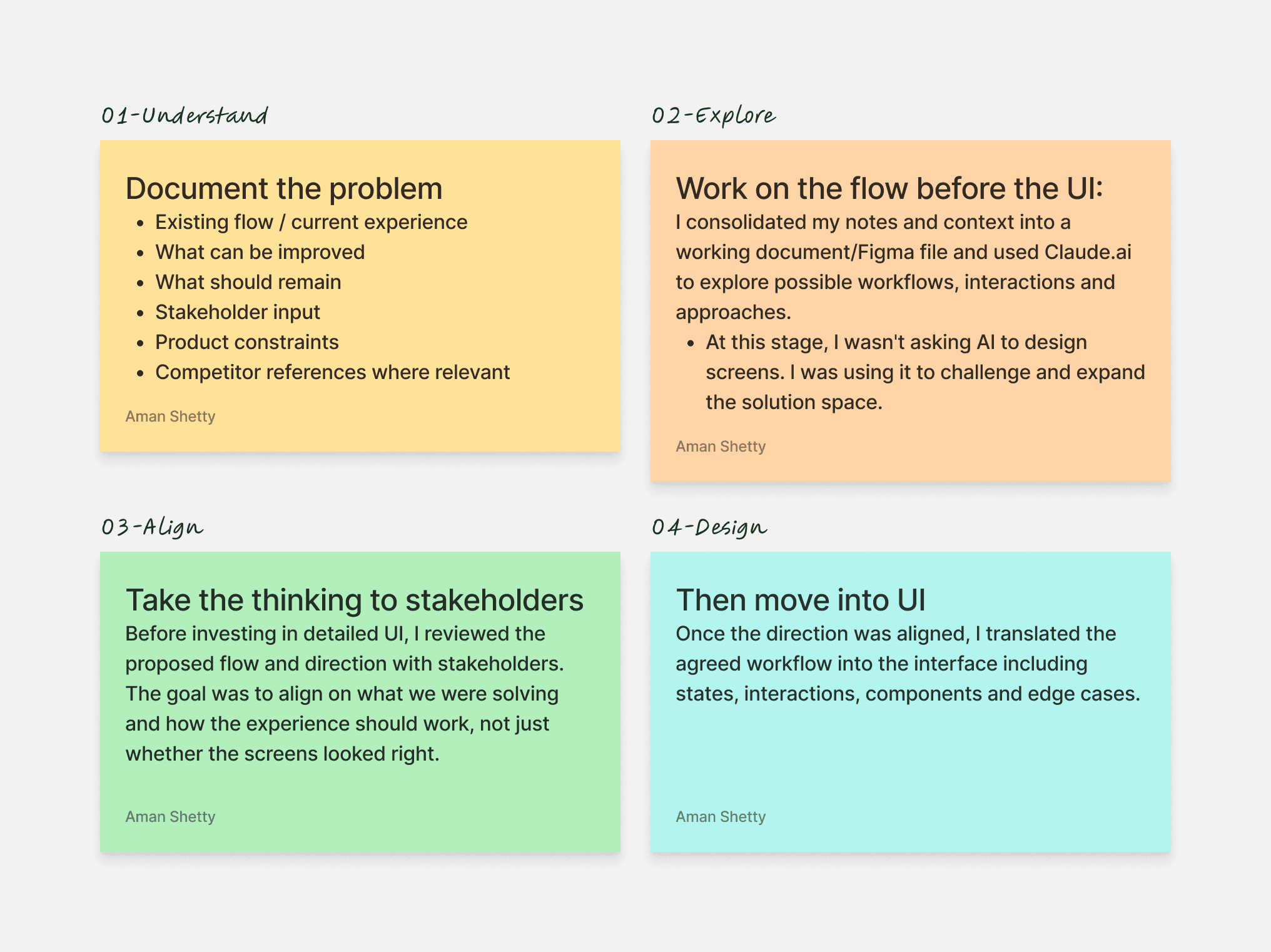
From problem → flow → alignment → UI
I didn't start these projects by designing screens.
For each feature, I first tried to understand the problem, document the constraints, and explore how the workflow should work before moving into UI.
Then make it a 4-step visual:
Built from scratch, designed to move fast
Qira was a Phase 1 product, so many of the workflows were designed and built from the ground up. My approach was to front-load the thinking, then move quickly into exploration and prototyping.
For each brief, I spend the first 1–2 hours researching the problem, breaking down the context, and using Claude to structure what I’ve learned into a detailed working document. I then discuss the findings and possible directions with stakeholders and the team before moving into design.
Once the direction is clear, I use the resulting artefacts alongside my connected design system to rapidly prototype and iterate in Figma. The depth varies by project, but the principle stays the same: understand quickly, align early, and spend more time exploring the right solution rather than starting every screen from scratch.
Designs
Refining the dashboard experience
Role-specific navigation for few different personas
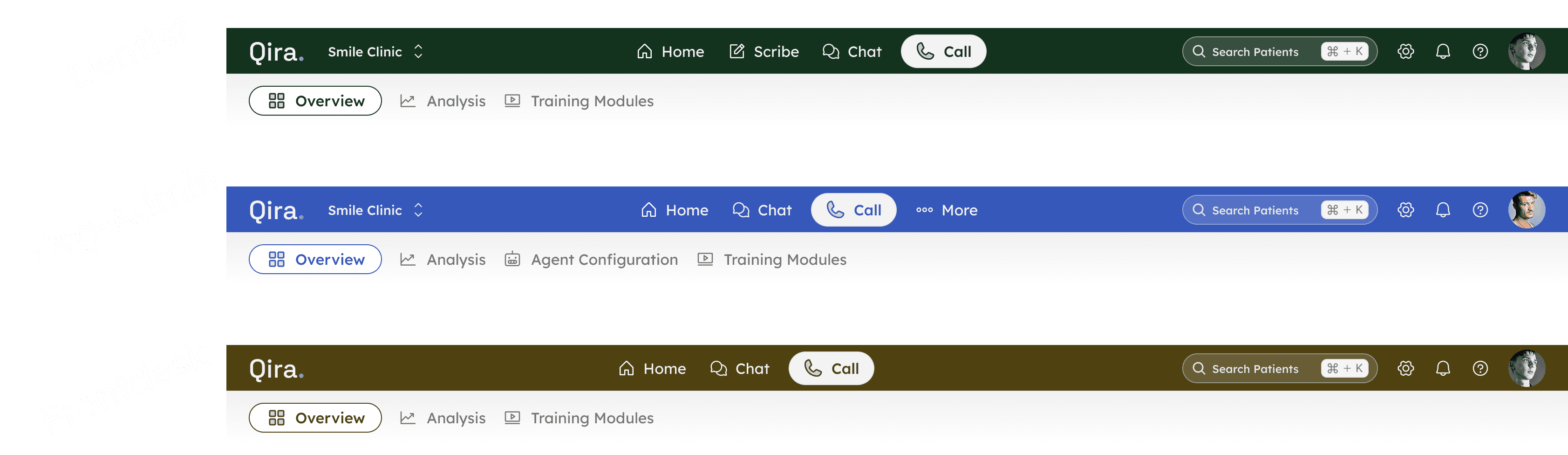
Navigation adapts to each user's responsibilities instead of exposing every feature to everyone.
Dentists prioritize patient care with quick access to Scribe, Calls, and Communication.
Front Desk workflows focus on appointments, patient records, and day-to-day operations.
Org Admins manage clinics, staff, integrations, and organizational settings from a unified workspace.
Users working across multiple clinics can switch contexts without leaving their workflow.
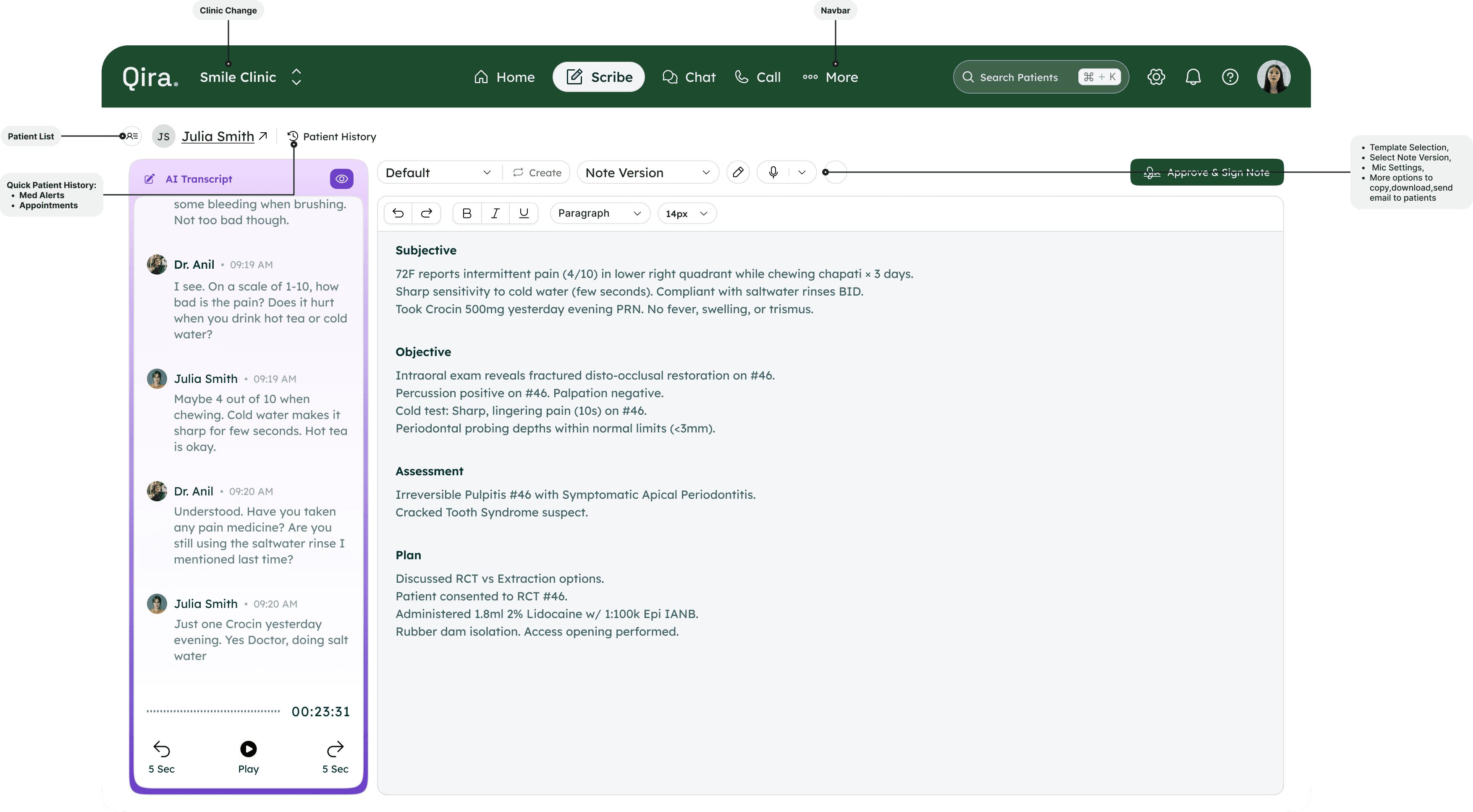
Reducing documentation effort with an AI-assisted workflow
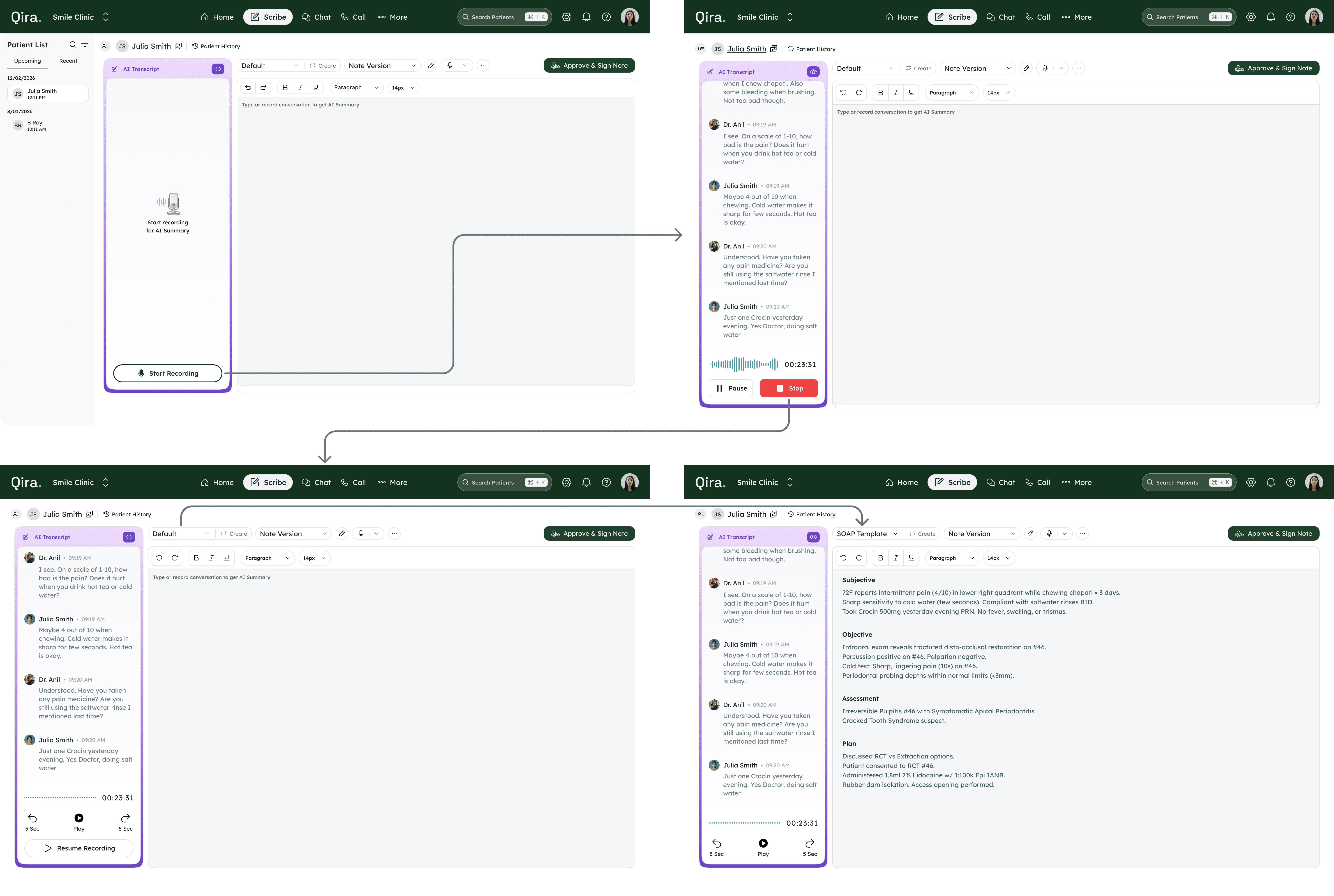
Recording, transcription, note generation, and review happen within one continuous workflow.
Live transcript allows dentists to pause, review, and continue consultations without losing context.
Multiple clinical templates generate structured notes for different documentation standards.
AI-generated notes remain editable before final approval and signature.
Final review keeps clinicians in control while reducing manual documentation time.
Turning call logs into actionable operational insights
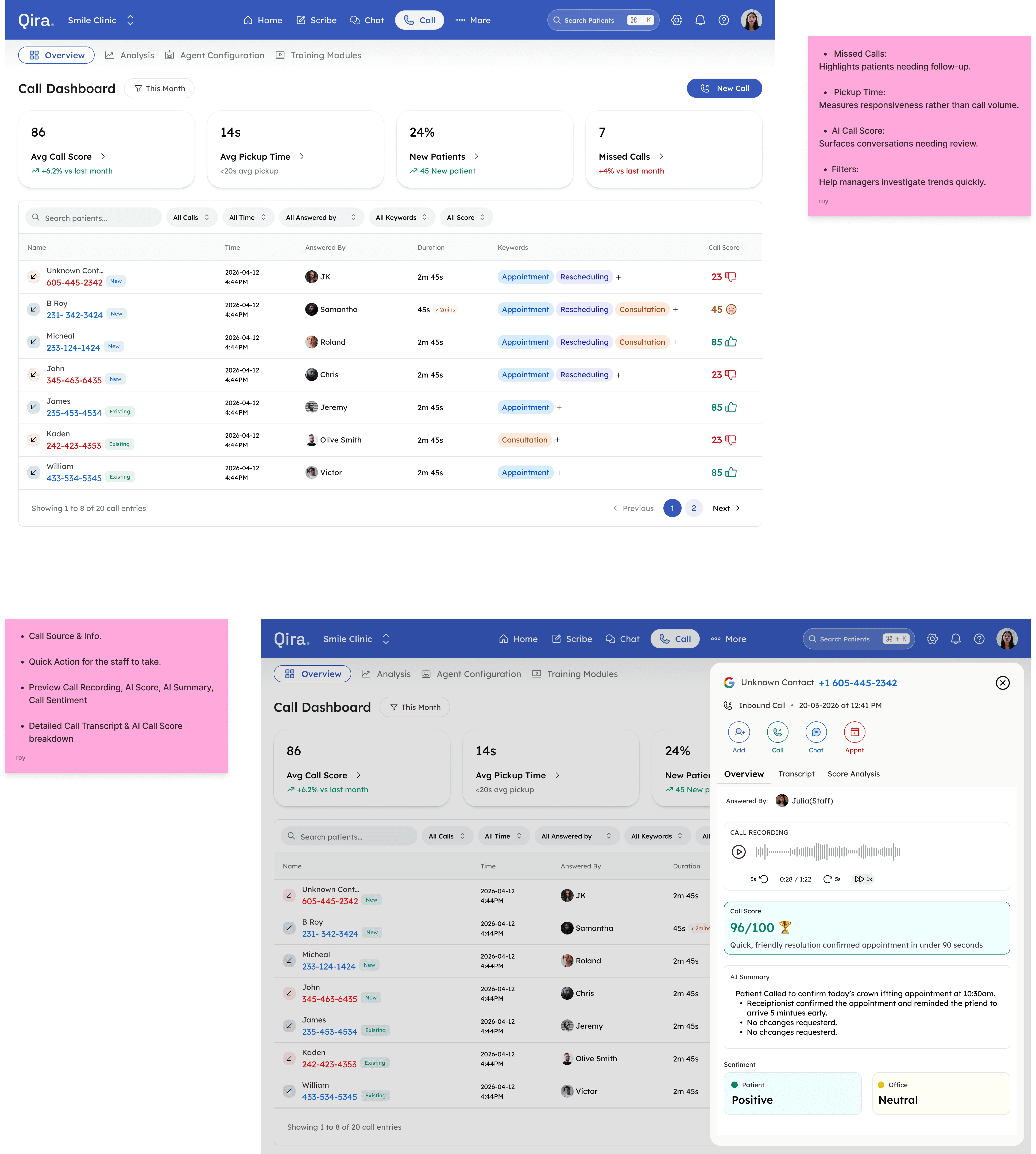
Surface AI-generated call quality scores instead of raw call logs.
Highlight missed calls and pickup times to help teams identify follow-up opportunities.
Filters and searchable history help managers investigate trends quickly.
Performance metrics encourage continuous improvement rather than passive reporting.
Patient communication without leaving the clinical workflow
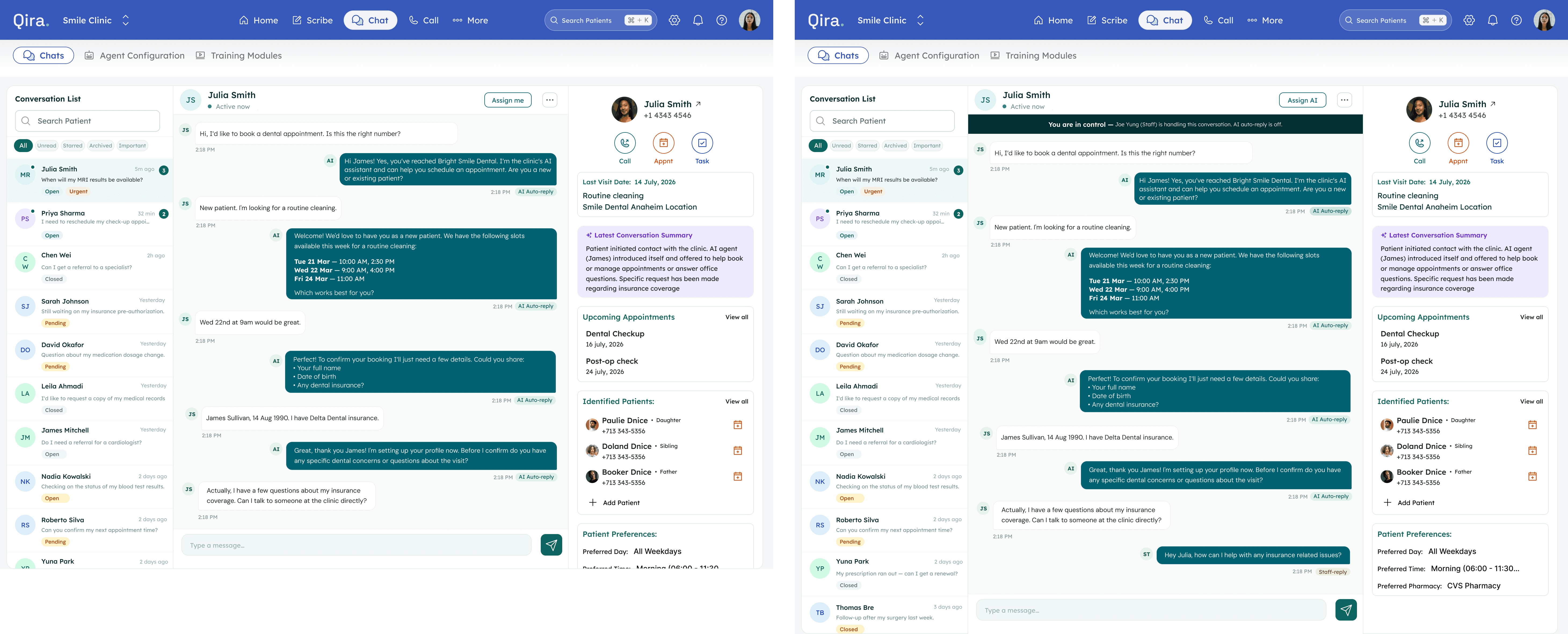
Assign conversations to the appropriate staff member directly from the inbox.
Book appointments and trigger patient actions without switching modules.
AI-generated conversation summaries reduce time spent reviewing long message threads.
Patient context remains visible throughout every interaction.
Prioritizing daily actions while keeping advanced tools accessible

Administrative tools stay accessible without increasing complexity.
Users can personalize navigation by pinning modules based on their workflow.
Reduces navigation clutter while maintaining access to the full platform.
Navigation designed around clinic workflows
Primary navigation changes dynamically based on user roles and permissions.
Clinic switching updates the entire workspace without interrupting active tasks.
Global search provides instant access to patients from anywhere using keyboard shortcuts.
Notifications centralize tasks, missed calls, messages, and system updates.
Persistent profile and settings provide quick access without disrupting workflows.
Lessons
Designing healthcare starts with understanding healthcare
Today, Qira is deployed across multiple clinics internationally. The product continues to evolve through ongoing feedback from dentists, clinic managers, and front desk teams, with active improvements to AI-assisted documentation and onboarding.
The experience of being the only designer in a fast-moving startup taught me one thing clearly: I work best when I'm close to the problem and close to the founder. Not just executing design briefs understanding why the product exists, who it's for, and what needs to change next. That's the kind of work I'm looking for going forward.