PagarBook
2025
FlyrApp
Making AI-powered product photography accessible to every small business

Overview
Removing the complexity between products and professional visuals.
Overview
FlyrApp is an AI-powered product photography platform built for small businesses that want professional catalog images without expensive photoshoots or prompt engineering.
As the Product Designer, I owned the end-to-end mobile experience—from onboarding and image generation to pricing, project management, and export—working closely with Android engineering from concept to launch.
Impact
• Launched MVP in 3 weeks
• 1M+ downloads
• <12 seconds from upload to download
• 45% free-to-paid conversion
• 48% increase in purchases after pricing redesign
Problem
Creating great catalog images shouldn't require a studio or prompt engineering.
Professional product photography is expensive, making it inaccessible for many small businesses selling online.
While AI image generation tools promised a cheaper alternative, they introduced a different problem prompt writing, technical settings, and unpredictable results.
Our users didn't want creative control.
They wanted professional-looking images they could trust without learning how AI works.
The challenge wasn't building another AI image generator.
It was making AI feel approachable for non-technical business owners.
Research
Understanding how small businesses actually create and sell products
Understanding the Users
Before designing the experience, I focused on understanding how small business owners actually created marketing content.
The majority of users were jewelry sellers, fashion retailers, and home decor businesses managing their own catalogs.
Across conversations and product discussions, a consistent pattern emerged:
• They wanted results, not creative experimentation.
• They didn't understand prompt engineering.
• They needed large batches of images within tight launch timelines.
• They were cautious about spending credits on unpredictable AI outputs.
This shifted the design challenge from "adding more controls" to reducing uncertainty throughout the workflow.
Ideation
Exploring interface directions
Key Insights
Users trusted examples more than AI. They wanted to see what was possible before uploading their own products.
Users preferred predictable templates over unlimited customisation. Consistency mattered more than creativity.
Most businesses repeated the same workflow across multiple products. The experience needed to optimize repeat usage rather than one-time generation.
Design Principles
Reduce cognitive load.
Build trust before asking for commitment.
Progressively reveal complexity.
Optimize for repeat business workflows.
Decision 1
Build Trust Before Asking Users to Upload
Our initial concept brought users directly into image generation.
During discussions, we realized users hesitated because they weren't confident AI could produce useful results for their products.
Instead of leading with an upload button, I redesigned the landing experience around inspiration.
The Home screen showcased previously generated images while Projects highlighted reusable templates, helping users understand the product before asking them to participate.
Decision 2
Progressive Disclosure Instead of Full Customization
The first prototype explored a fully customizable workflow.
Although powerful, users became overwhelmed by the number of decisions required before generation.
I redesigned the flow using progressive disclosure.
Every user completed the core journey with a single upload, while advanced customization such as models, backgrounds, and prompt refinements remained optional.
This balanced simplicity for first-time users with flexibility for experienced customers.
Decision 3
Design Around Templates Rather Than Prompts
Rather than expecting users to describe the image they wanted, Flyr provided curated templates tailored for Indian businesses.
Users selected the outcome they wanted such as jewelry photography, fashion models, or home interiors and uploaded their product.
The template carried the creative complexity, allowing users to focus on their business instead of prompt writing.
Decision 4
Organize Around Products, Not Files
Businesses rarely generated a single image.
They produced dozens of marketing assets for the same product.
Instead of storing images in a flat gallery, I introduced project-based organization, enabling users to group generations, revisit previous work, and export assets more efficiently.
The experience better reflected how businesses actually manage product catalogs.
Decision 5
Simplify Purchasing Decisions
Pricing was a key point of friction during onboarding.
Rather than presenting multiple similar plans, I simplified the pricing structure into two primary tiers with a clear recommended option.
Reducing unnecessary choices improved purchasing confidence while keeping the experience easy to compare.
Designs
Refining the dashboard experience
Organising creation workflows around business outcomes
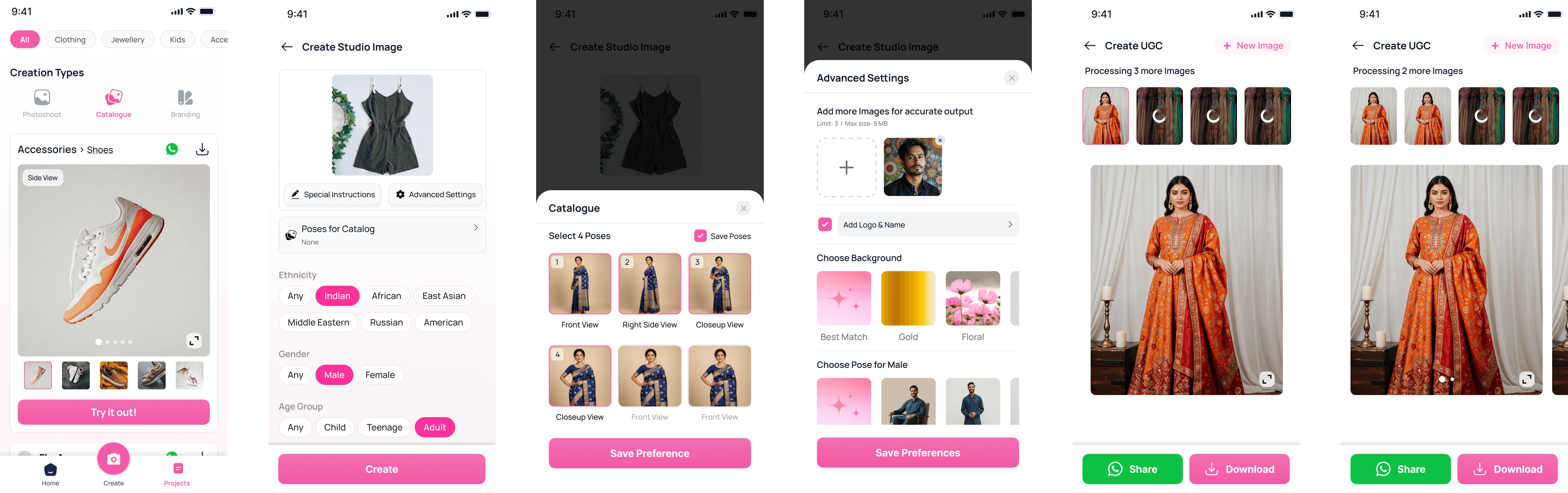
The navigation separates Photoshoots, Catalogs, and Branding into dedicated creation journeys.
Home surfaces recent work and recommended templates, allowing users to continue previous projects or explore new ideas.
Projects organize completed work for quick editing, regeneration, and export.
Each workflow minimizes decisions by guiding users through one creation path at a time.
Progressive image generation workflow

Users begin by selecting a creation template instead of writing complex AI prompts.
Uploading products, choosing models, and selecting backgrounds happen step by step to reduce cognitive load.
Advanced customization remains optional, allowing experienced users to refine results without overwhelming beginners.
Generated images can be previewed before downloading or sharing directly with customers.
The workflow balances simplicity for first-time users with flexibility for repeat business owners.
Simplifying pricing decisions to improve conversion
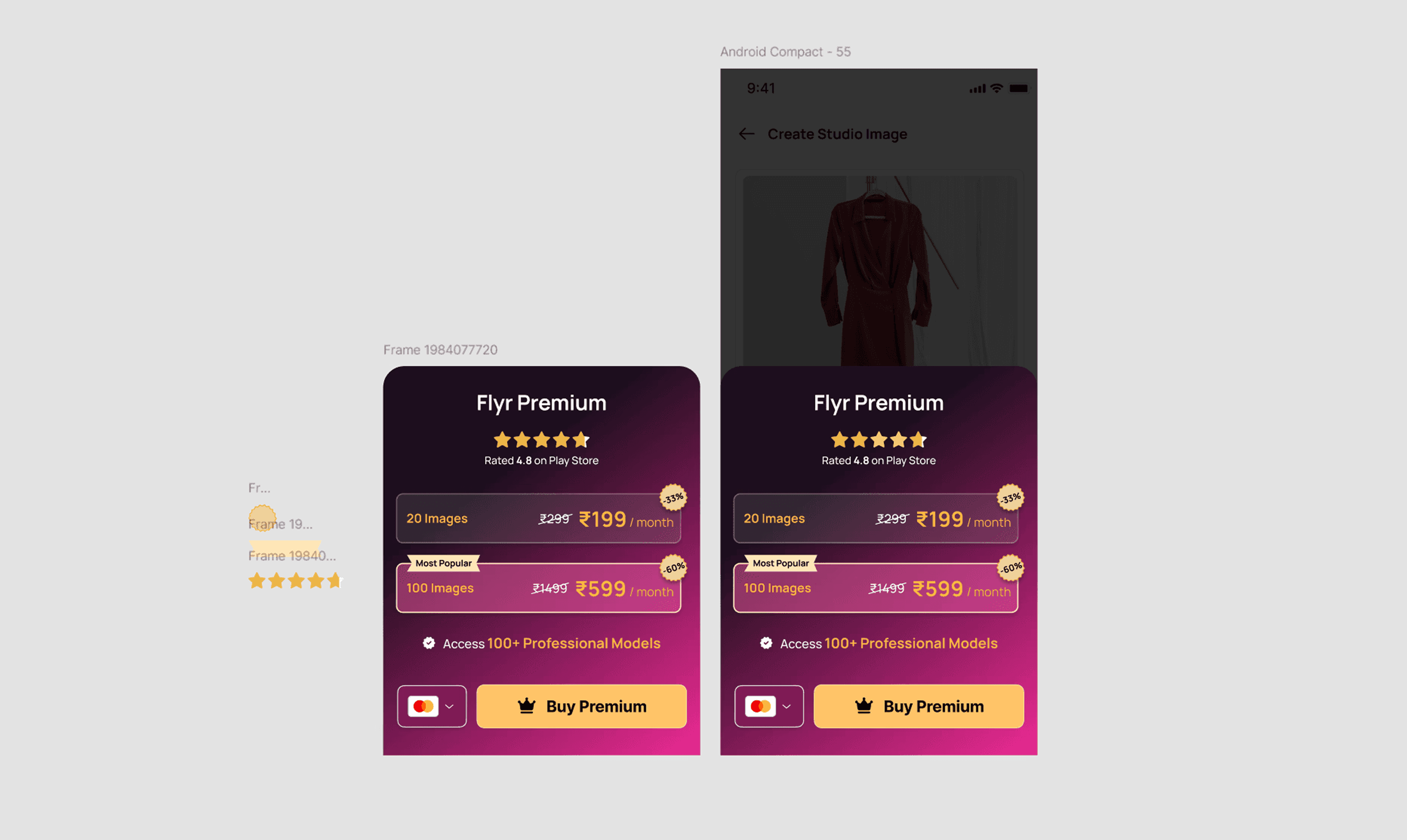
Reducing four pricing plans to two simplified purchasing decisions and increased subscription conversions during testing.
Simplifying pricing from four plans to two increased paid conversions by approximately 48% during internal experiments.
Lessons
Designing for clarity, confidence, and everyday financial workflows
Results
Launch
• MVP shipped in 3 weeks.
Engagement
• Average workflow completed in under 12 seconds.
• Users generated an average of 32 images per session.
Business
• 45% free-to-paid conversion.
• Pricing redesign increased purchases by 48%.
Growth
• Product grew beyond AI photoshoots into branding and catalog tools while maintaining the original design principles.
Reflection
This project changed how I think about AI products.
Initially, I believed the challenge was simplifying image generation. Through research and iteration, I realized the real challenge was building trust.
Small business owners weren't looking for more creative control they wanted confidence that the product would consistently deliver professional results without requiring technical knowledge.
That lesson continues to influence how I approach AI-powered product design today.